How to Record a Meeting on Your Phone: iPhone, Android and Mic Placement
Record meetings with the built-in apps on iPhone and Android, place the phone so every voice is captured clearly, and handle consent before you hit record.
Both iPhone and Android record meetings well with the apps already on the device: Voice Memos on iPhone, Recorder or the manufacturer's equivalent on Android. What decides the quality is not the app but where you put the phone and how noisy the room is. This guide covers the steps on each platform, how to position the device, and what to know about consent before you press record.
Recording a meeting on iPhone
Voice Memos ships on every iPhone and is good enough for a meeting held in a room.
- Open Voice Memos. If you cannot find it, swipe down on the home screen and type the name.
- Turn on high quality: Settings → Voice Memos → Audio Quality → Lossless. Few people change this, and it makes a visible difference in rooms with echo.
- Tap the red button to start. Lay the phone flat, microphone facing up, in the middle of the table.
- Switch on Airplane Mode, or at least Do Not Disturb. An incoming call interrupts the recording and you lose the middle of the meeting.
- Stop when the meeting ends. The recording saves automatically, so rename it right away as "date - meeting name" or you will never find it again.
- Share the file over AirDrop, email, or save it to Files to move it to a computer.
Watch the storage: an hour of Lossless takes roughly 600 MB, while the compressed setting takes about 30 MB. For long meetings, check free space before you start.
Recording a meeting on Android
The app name varies by manufacturer, but the approach is the same.
- Open the built-in recorder. Pixel calls it Recorder, Samsung calls it Voice Recorder, Xiaomi calls it Recorder as well. If your device has none, Google's Recorder is a free download.
- If the app offers modes, pick Meeting or Interview rather than standard. That widens the pickup range enough to catch people sitting further away.
- Grant microphone permission if prompted, then start recording.
- Place the phone in the middle of the table. Do not lay it screen-down, and do not leave it in a bag or under a stack of paper.
- Silence notifications or enable Airplane Mode so nothing interrupts the recording.
- Save and rename the file as soon as you finish.
Pixel's Recorder also transcribes on-device, though quality varies a lot by language. Treat it as a way to search inside a recording rather than a source for finished minutes.
Where to put the phone
This matters more than every software setting combined.
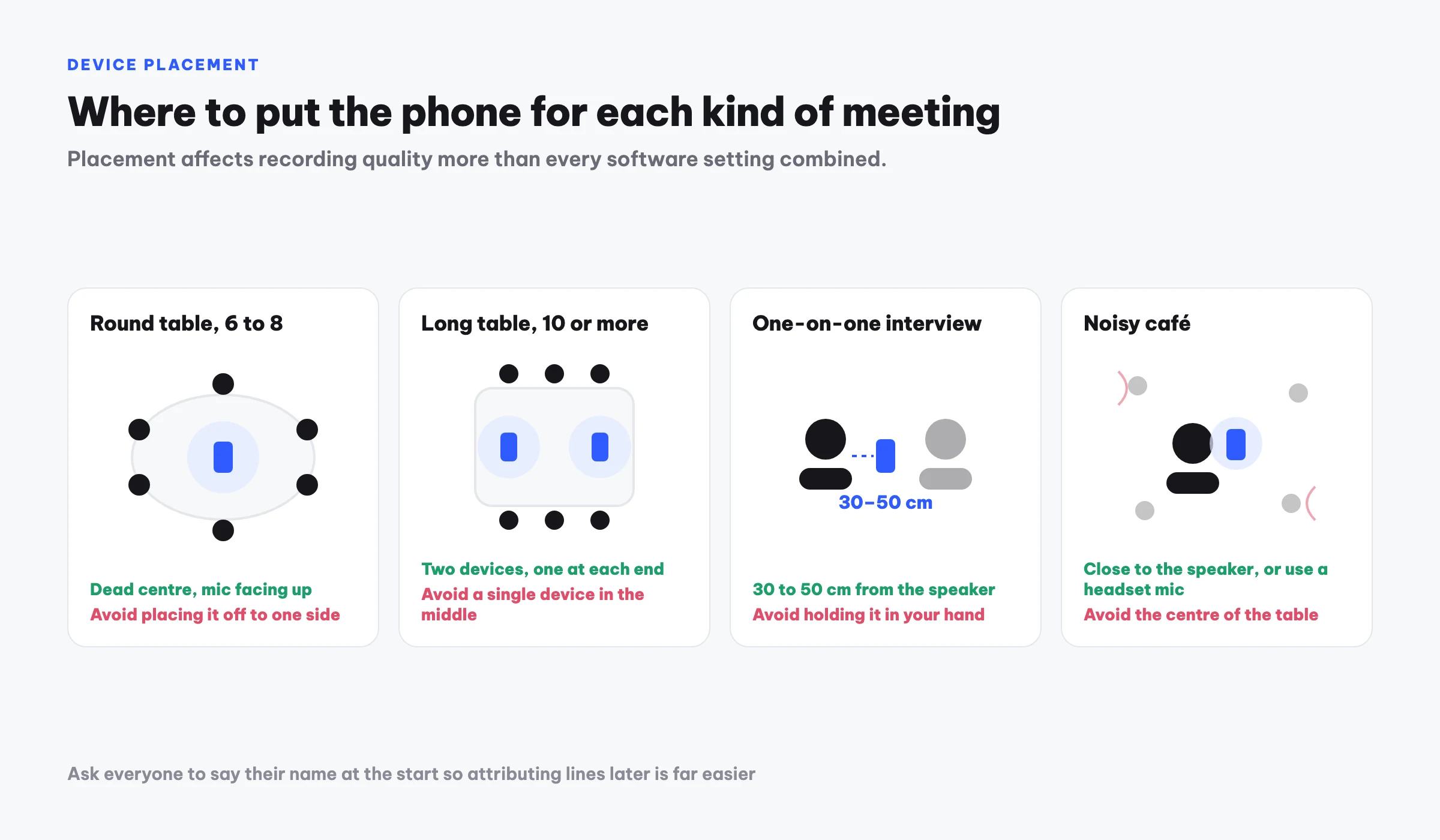
| Situation | Placement | Avoid |
|---|---|---|
| Round table, 6 to 8 people | Dead centre, mic facing up | Off to one side |
| Long table, 10 or more | Two devices, one at each end | A single device in the middle |
| One-on-one interview | 30 to 50 cm from the speaker | Holding it, which adds handling noise |
| Noisy café | Close to the speaker, or use a headset mic | Centre of the table, as in a meeting room |
| Meeting over a speakerphone | Near the speaker but not touching it | Directly against the speaker, which clips |
Three general rules: put the device on a hard surface rather than a thick tablecloth, keep anything from covering the microphone, and stay away from projectors or fans, because steady background noise degrades the entire recording.
One small trick that pays off: at the start, ask everyone to say their name once. When you replay the audio or run speaker separation, attributing lines to people becomes far easier.
Do you need consent to record
You should ask, and in many situations you must.
Practically, one sentence at the start does it: "I am recording this so I can write up the minutes, is everyone comfortable with that?" It is courteous, and it puts the evidence of consent inside the recording itself.
Legally, the rules vary by jurisdiction and they matter. Some places require only one party to consent, others require every participant to agree, and recording without the required consent can be a criminal matter rather than a technicality. Workplace policies and any confidentiality agreement you have signed add another layer on top of the law.
Some contexts deserve real caution: meetings with legal counsel present, HR and disciplinary discussions, and anything involving an individual's health or financial information. In those cases, written consent is safer than a verbal nod.
What to do with the audio file
The recording alone does not solve the problem. Nobody replays an hour of audio to find one sentence. Three ways forward:
- Replay and type it up. The most accurate route, and it costs two to three hours per hour of audio.
- Run it through a speech-to-text tool. Much faster, but you get back a raw wall of text and still have to summarise it and pull out the tasks yourself.
- Use a tool that builds the minutes. The recording is transcribed and then structured for you. With Meco you upload the file and get minutes back with a summary, decisions and an action table, or record inside the app and skip the file transfer. If you would rather write them yourself, these four meeting minutes templates are ready to use.
Whichever route you take, rename the file with the date and the meeting name the moment you stop recording. A folder full of "New Recording 47" is the fastest way to make your archive worthless.
Frequently asked questions
Is a phone recording good enough to produce minutes?
Yes, provided the phone sits in the middle of the table and the room is not too loud. Microphones on recent phones capture clearly within about two metres. Problems almost always come from placement rather than hardware.
Can a phone record calls?
iPhone does not allow third-party apps to record calls, a platform restriction. Some Android devices include call recording, depending on the manufacturer and the country. The common workaround is to put the call on speaker and record with a second device.
How much storage does an hour of audio take?
On iPhone, roughly 30 MB per hour compressed and about 600 MB per hour in Lossless. On Android it depends on the format, typically 30 to 60 MB per hour at standard quality.
How do I record an online meeting?
If you are the host, the built-in recording in Zoom, Google Meet or Teams is the cleanest option. Without host rights, you can place a phone next to your computer speakers, though quality suffers and you should tell the other participants first.
Which file format should I use?
Common formats like m4a or mp3 work with virtually every tool you might use afterwards. Just avoid proprietary formats from niche recording apps, since you will have to convert them before doing anything else.
Try Meco for free
Record or upload a meeting and get minutes with decisions and action items right away. First hour free.
Start for free